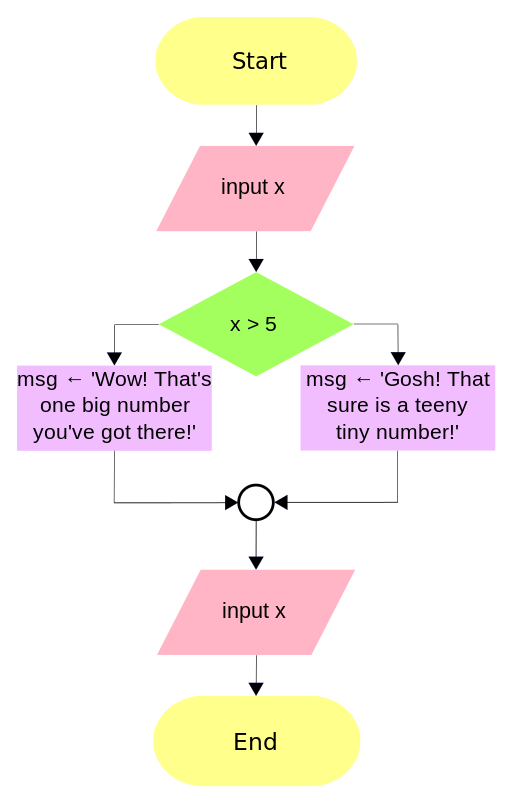
A flowchart is a visual representation of a process or algorithm, consisting of various symbols connected by arrows to indicate the flow of execution.
Why are Flowcharts Used?
Flowcharts are used to simplify complex procedures and make them easier to understand. They are commonly used in fields such as computer programming, business processes, and decision-making.
Flowchart
Terminator Symbols
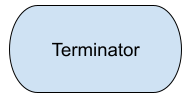
A terminator symbol shows the start or end of a flowchart. It is usually drawn as a rounded rectangle or oval. The symbol is labelled Start at the beginning and End at the end.
Every complete flowchart should normally have a clear starting point and ending point.
Why is it important for a flowchart to have a terminator symbol?
Input and Output in Flowcharts
Input allows a program to receive data, such as a name, age, or number, from a user or another source.
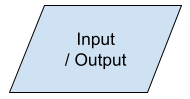
Output is the information produced by a program, such as a message, calculation, or result. In flowcharts, input and output are usually shown using a parallelogram shape.
What is the primary purpose of input in a program?
Decisions in flowcharts
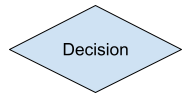
Decisions allow a flowchart to choose what happens next based on a condition. A decision is shown using a diamond shape and usually has two possible paths, such as Yes and No.
Decisions help programs respond differently depending on information, making them useful for solving problems and controlling how a program behaves.
A decision is shown using a shape and usually has two possible paths, such as Yes and No.
For loops in flowcharts
A for loop is an example of definite iteration, meaning we know in advance how many times the instructions will repeat.
In a flowchart, a counter keeps track of the number of repetitions. The loop continues until the required number of repetitions has been completed, then the flowchart moves on.
Match up the keywords and definitions
While loops in flowcharts
A while loop is an example of indefinite iteration, meaning we do not necessarily know in advance how many times the instructions will repeat.
A condition is checked before each repetition. If it is True, the loop continues. If False, the loop stops and the flowchart moves on.
What is a flowchart?
A decision symbol in a flowchart is represented by a shape.
Processes in Flowcharts
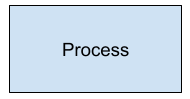
A process is an action that a program carries out to change, calculate, or work with data. Processes can include calculations, assigning values, or manipulating information.
In a flowchart, a process is shown using a rectangle. For example, a program might calculate a total or increase a counter.
A flowchart symbol that is used to indicate the start or end of a program is represented by .
Flowcharts provide a visual representation of the of a process or algorithm.
Subprocess Symbol
A subprocess symbol shows a call to a subroutine that is drawn as its own separate flowchart. It is a rectangle with an extra vertical line down each side, and is sometimes called a predefined process.
Write the subroutine's name inside, for example CalculateTotal.
The separate flowchart starts with a terminator showing the same name.
When it ends, control returns to the main flowchart.
This keeps the main flowchart short and lets a task be reused.
What does a rectangle with an extra vertical line down each side represent in a flowchart?
Pros of Flowcharts
Clarity and Visualization
Makes complex processes easy to understand.S
hows the sequence of steps, decision points, and interactions clearly.
Simplifies Communication
Useful for explaining processes to people with different levels of expertise.
Facilitates collaboration among team members.
Problem Solving and Analysis
Helps identify redundancies, inefficiencies, and bottlenecks in a process.
Useful for debugging algorithms or workflows.
Why is visualization important when explaining complex processes?
Cons of Flowcharts
Complexity with Large Systems
For very large processes, flowcharts can become too big and hard to read.
May require splitting into multiple charts, which can reduce clarity.
Time-Consuming
Creating detailed flowcharts can be labor-intensive, especially for dynamic or complex processes.